Engine Controls - MIL ON/O2 A/F Sensor DTC's Set
Classification:EC04-005
Reference:
NTB04-024
Date:
February 19, 2004
2004 MAXIMA & QUEST (4 SPD A/T OR 6 SPD M/T ONLY); MIL "ON" WITH DTC P1031, P1051, P1148, P1168 A/F SENSOR HEATER/CLOSED LOOP
APPLIED VEHICLES:
2004 Maxima (A34) with 4 speed A/T or 6 speed M/T only
2004 Quest (V42) with 4 speed A/T only
NOTE:
Models with 5 speed A/T are not applicable to this TSB For those vehicles, refer to NTB04-028
IF YOU CONFIRM:
A MIL "ON" with the following DTC(s) stored:
^ P1031/P1051 (A/F Sensor Heater), and/or
^ P1148/P1168 (A/F Sensor Closed Loop Control),
ACTIONS:
1. Confirm this bulletin applies:
^ Check the Current ECM Part Number (steps 1 and 2 in the Service Procedure).
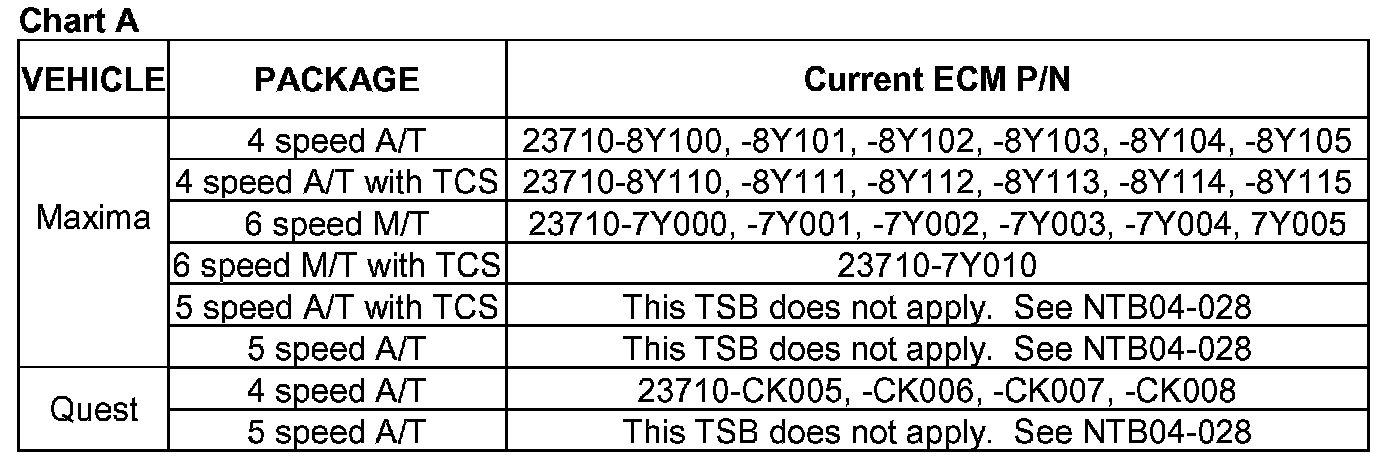
^ Compare your Current ECM Part Number to Chart A shown.
If your Current ECM part number does not match one in Chart A, this bulletin does not apply. Refer to the appropriate TSB or Service Manual (ESM) for further diagnostic and repair information.
2. Reprogram the ECM (needed if a match is found during ECM Part Number Check).
3. Perform A/F Sensor test (steps 4 - 6).
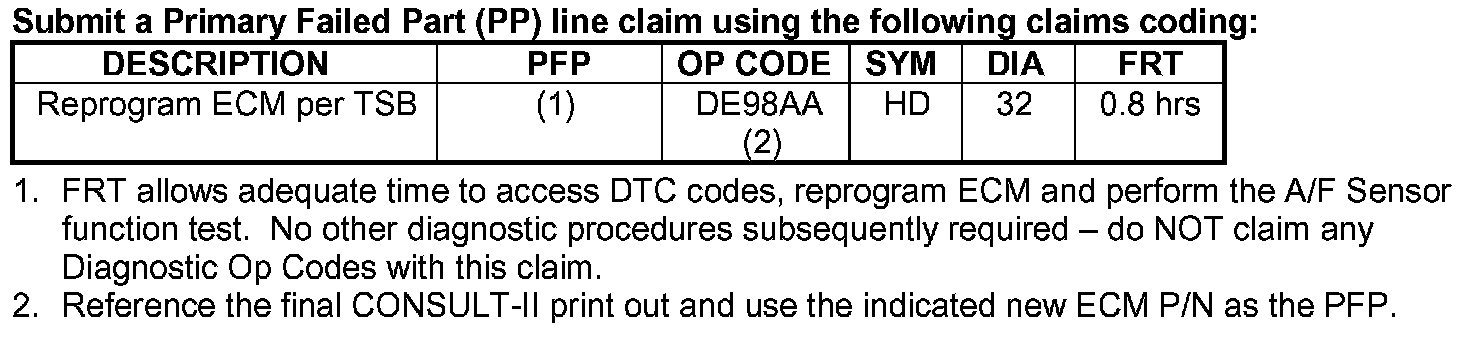
CLAIMS INFORMATION
SERVICE PROCEDURE
Confirm This Bulletin Applies

1. With CONSULT-II "ON", print the Freeze Frame data as shown.
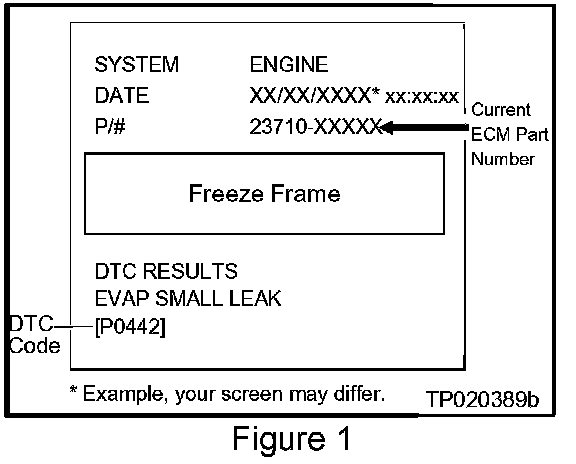
2. Attach this printout to the Repair Order.
^ The Freeze Frame data that you've printed contains the ECM Part Number (P/N).
^ Figure 1 is an example of the F.F. Data printout.
ECM Part Number Check:
3. Using the ECM Part Number printout from Step 1 (Figure 1);
^ Compare the vehicle's current ECM P/N to those shown under Current ECM P/N in Chart A, below:
^ This comparison will allow you to determine if the ECM needs to be reprogrammed.
A. If your vehicle's ECM P/N matches a P/N in the chart above:
^ Perform ECM Reprogramming, then
^ Perform A/F Sensor Test (step 4).
B. If your vehicle's ECM P/N does not match a P/N in the chart above:
^ This bulletin does not apply. Refer to the appropriate TSB or Electronic Service Manual (ESM) for further diagnostic and repair information.
Perform A/F Sensor Test
4. Use CONSULT-II DATA MONITOR to view;
^ Engine Speed, and
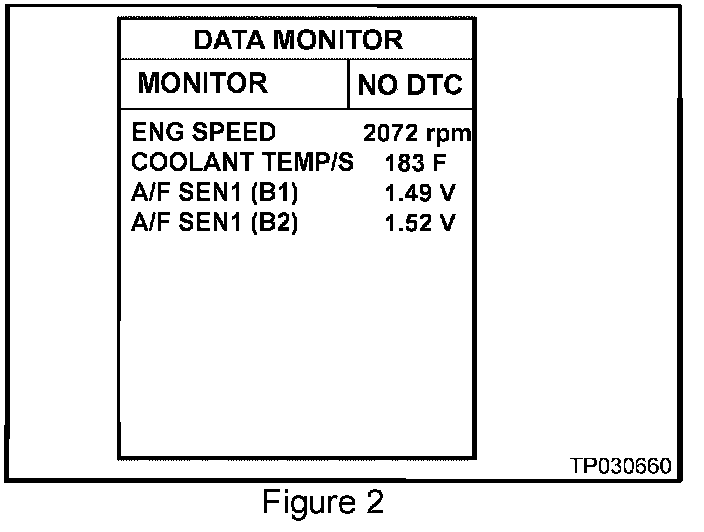
^ A/F Sensor voltage (see Figure 2).
5. Hold the engine speed at about 2000 rpm no-load for 2 minutes.
^ This will create a stable condition for step 6.
6. Observe A/F SEN1 (B1) and A/F SEN1 (B2) voltage for 30 seconds while holding 2000 rpm no-load.
a. A/F sensor voltages should remain (most of the time) between 1.37 and 1.57 volts.
^ If the engine rpm is held constant, voltage will fluctuate, but should remain in this range.
b. If, most of the time, the A/F sensor voltages are out of this range:
^ The vehicle has an additional incident.
^ This bulletin does not have repair information for an A/F Sensor or Fuel Management System incident.
^ Use the appropriate Service Manual (ESM), section EC (P1031 / P1051 / P1148 / P1168), to further diagnosis and repair the additional incident.
ECM REPROGRAMMING
Vehicle ECM Reprogramming Overview
^ There are four basic steps
1. Download reprogramming data (transfer it) from ASIST into CONSULT-II.
2. "Preparation" steps before reprogramming.
3. Reprogram the vehicle ECM.
4. "Wrap-up" after reprogramming is finished.
^ For those familiar with ECM Reprogramming, please review the following steps and use them as a Quick Reference for ECM reprogramming.
Step One: Download (Transfer) Data From ASIST Into CONSULT-II
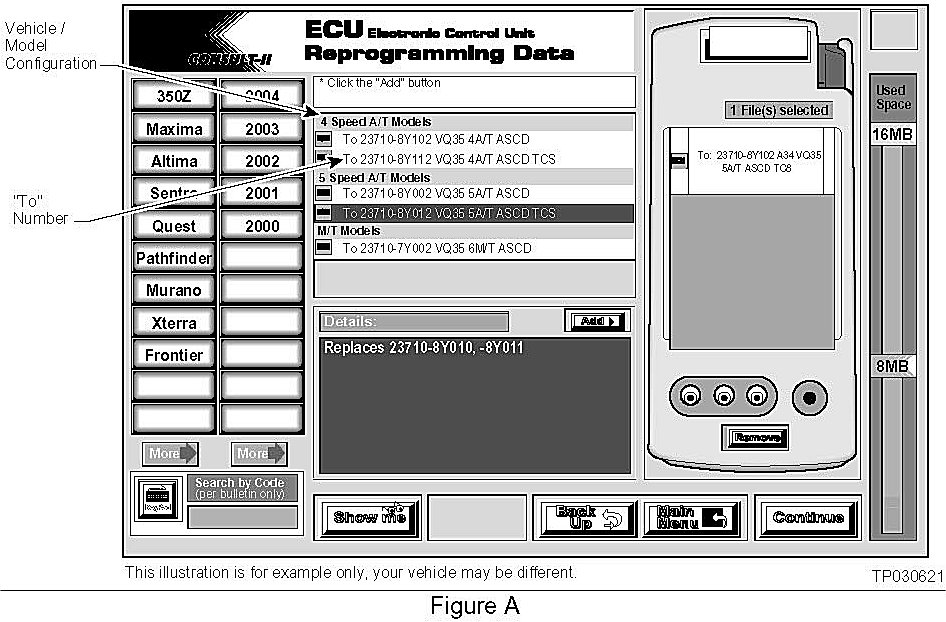
1. Select vehicle model and model year (Example: Maxima, 2004).
2. Select the correct reprogramming data:
a. Locate the specific "Model Configuration" (Example: VQ35 4A/T ASCD TCS).
NOTE:
Model Configuration may include items such as engine type, transmission type, and vehicle options such as ASCD, TCS, ABS etc.
b. Select (click on) the "To" number. (Write the "To" number on the repair order.)
NOTE:
The "To" number will read: 23710-XXXXX.
3. Click on the "Add" button.
^ This will add the selected data to the "File(s) Selected" list.
4. Click on "Continue" and follow directions to perform "data transfer" (download) from ASIST into CONSULT-II.
Step Two: Preparation for Reprogramming ECM
1. Connect a battery charger to the vehicle's battery.
^ Set the charger to a low charger rate (trickle charge).
CAUTION:
DO NOT connect the CONSULT-II AC power supply for items 2 and 3.
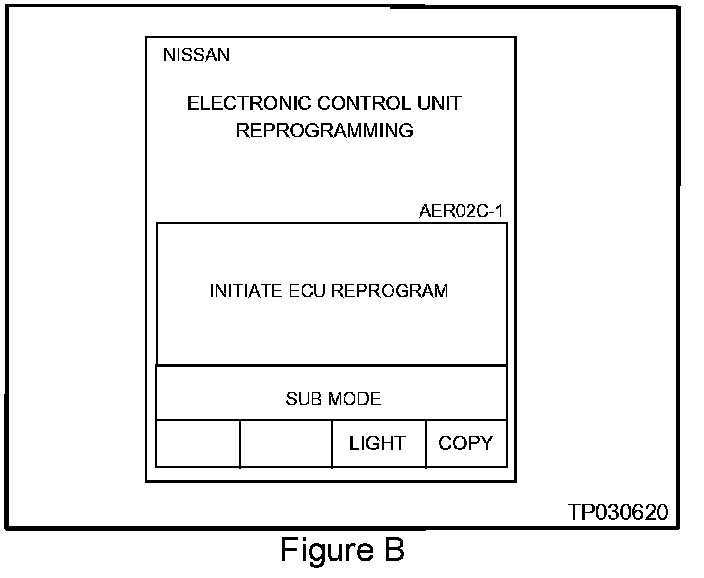
2. Press [SUB MODE] (see Figure B) then:
a. From the listed items, find and select [BATTERY CHARGE].
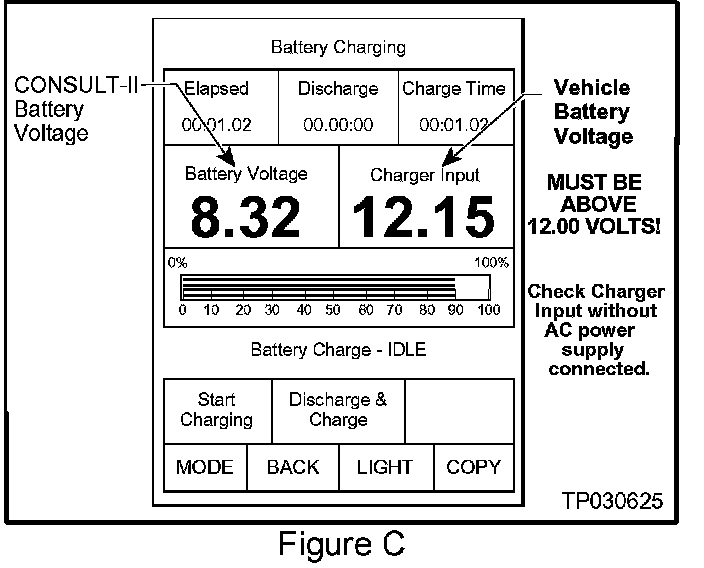
3. Check the CONSULT-II's "Charger Input" reading (see Figure C).
NOTE:
^ "Battery Voltage" is the voltage level of CONSULT-II's battery.
^ "Charger Input" is the voltage level of the vehicle's battery. (It must be above 12 volts.)
Step Three: Reprogram the Vehicle ECM
Step Four: "Wrap-up" After Reprogramming is Finished
1. Turn the ignition switch "OFF" and CONSULT-II "OFF".
2. Wait more than 10 seconds, then;
a. Turn the ignition switch "ON" for 1 second, then
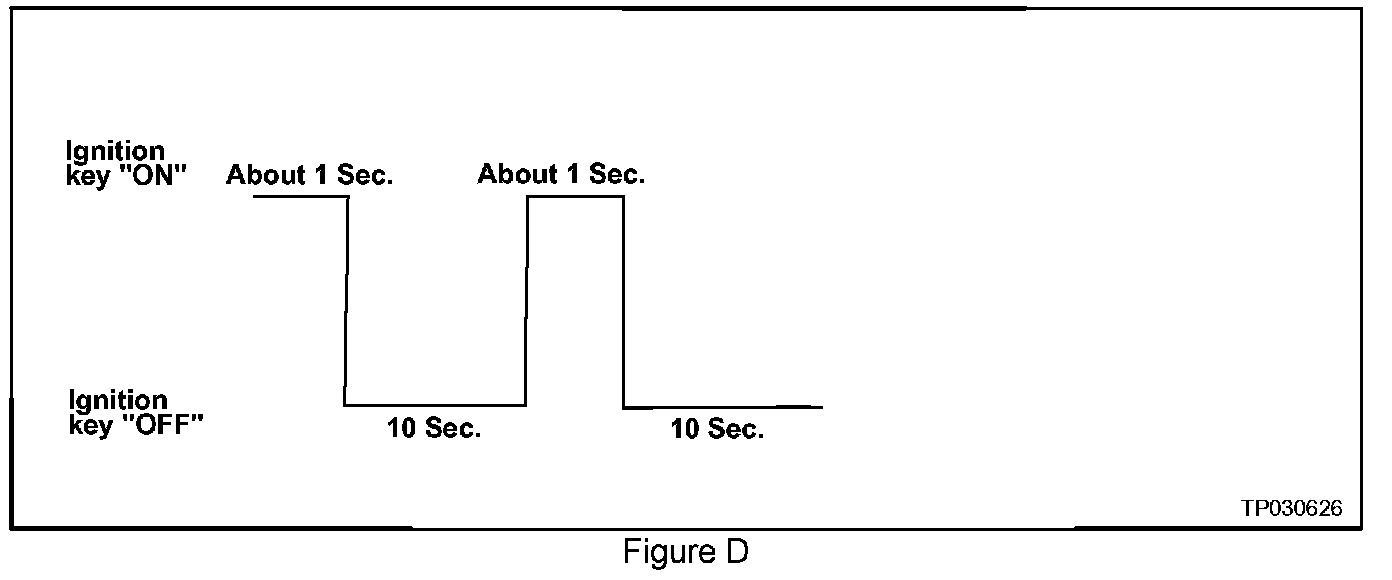
b. Turn the ignition switch "OFF" again for 10 seconds (see Figure D). This will reset ECM "self learned" Data.
3. Start the engine and check the idle speed.
^ If idle speed is too low, perform IAVL (Idle Air Volume Learning). See the appropriate Service Manual (ESM) for this procedure.
NOTE:
If the engine will not idle, hold the engine RPM at about 2000, then slowly bring it down to an idle. IAVL can now be performed.
4. Confirm the engine is operating normally.
5. Make sure the "Check Engine Light" (MIL) is not "ON".
^ If necessary, use CONSULT-II and the Diagnostic (red/white) Card to erase any DTC's that may have stored during the reprogramming procedure.