Programming and Relearning
DIAGNOSTIC ASSIST FUNCTION [Bluetooth SYSTEM (HANDS-FREE TELEPHONE (HF/TEL) SYSTEM)]
Software Version Verification
1. Launch the on-board diagnostic test mode. DTC Inspection
2. Press the SEEK/TRACK down button to display the oldest error code of the error codes that have been recorded.
NOTE:
- If an error code has not been recorded, No Err is displayed.
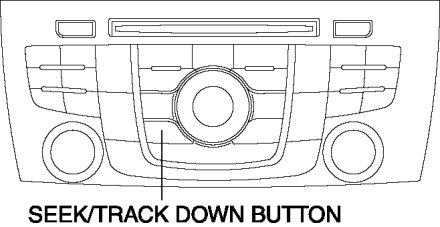
3. Press the SEEK/TRACK down button.
4. Verify the software version.

5. Switch the ignition OFF (LOCK) to stop the on-board diagnostic test mode.
Connection Condition Verification
1. Launch the on-board diagnostic test mode. DTC Inspection
2. Press SEEK/TRACK down button to display the software version.
3. Press the SEEK/TRACK down button.
4. Verify the connected unit.

5. Switch the ignition OFF (LOCK) to stop the on-board diagnostic test mode.
Password Reset
1. Switch the ignition to ACC or ON.
2. Press the PRESET 2 button while pressing the AUTO-M button until the password reset verification beep sound is heard.
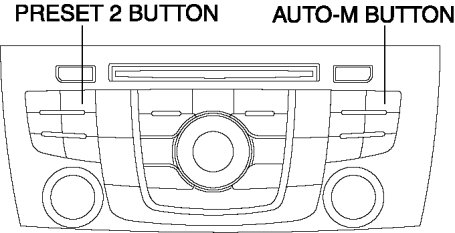
3. Verify that "Clear" is displayed in the information display.

4. Switch the ignition OFF (LOCK) to stop the diagnostic assist function.