Campaign - ECM Reprogramming for Driveline Shudder
XT303-S953X-TYPE
DATE: 06/04
MODEL:
2004 MY X-TYPE
3.0L Auto. Trans.
VIN:
D55322-D86655
Driveline Shudder/Hesitation - 30 - 50 MPH - Automatic Transmission Vehicles - Reprogram ECM - Service Action S953
Issue:
A concern has been identified on 2004 MY X-TYPE 3.0 Liter automatic vehicles, within the above VIN range. The engine management software can cause the vehicle to shudder or hesitate. This condition will only be experienced at a vehicle speed of 30 mph - 50 mph (50 km/h - 80 km/h) with the transmission in normal mode and in fifth gear with the throttle pedal lightly depressed (as to accelerate slightly or maintain speed on a small incline).
Action:
On 2004 MY X-TYPE 3.0 Liter automatic vehicles, within the above VIN range, reprogram the ECM with the latest level of software using World Diagnostic System (WDS) Release JTP 759 CD30 or later.
Unsold vehicles should be repaired prior to hand over to the customer. Sold vehicles should be repaired at the first available opportunity.
WORKSHOP PROCEDURE
1. Position WDS alongside vehicle, switch Portable Test Unit (PTU) 'ON' and allow software to load.
Note:
Ensure WDS is loaded with software release JTP 759 CD30 or later. Ensure the following conditions are met:
^ PTU is docked on the base station.
^ Vehicle's battery is at 12.5 volts or above.
^ All Diagnostic Trouble Codes are cleared.
^ Transmission oil temperature is not above the recommended value.
2. Connect PTU to vehicle using diagnostic cable.
3. Enter vehicle VIN and navigate to configuration main menu.
4. Select and run 're-configure existing ECM' application.
5. After re-configuration of ECM is complete, switch 'OFF' PTU, disconnect from vehicle and return WDS to original location.
Warranty Information:
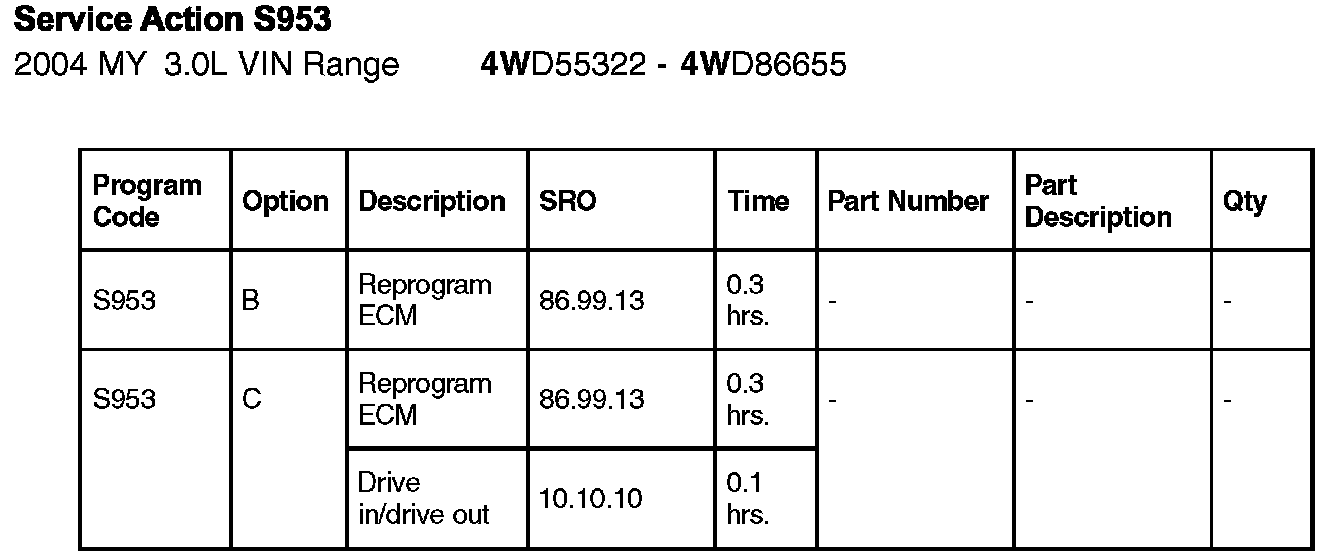
Warranty claims should be submitted quoting program code S953 together with the appropriate option code from the table. This will result in payment of the stated time and, where applicable, parts/miscellaneous expense codes.
The options that allow for the drive in/drive out can only be claimed if the vehicle is brought back in to the workshop for this action alone to be undertaken.
NOTE:
Always perform a DDW claim search first to determine whether this service action has been performed on this vehicle. The "Review Claim History" function will provide a listing of all claims against the vehicle. If this service action number appears in the program code field, do not perform this service action.