VSA Module - Indicator ON DTC 25 Set
00-038December 18, 2000
Applies To:
2000 3.5RL - From VIN JH4KA9...YC000001 thru JH4KA9...YCO13801
VSA System Indicator On With DTC 25
SYMPTOM
The VSA indicator comes on while driving on winding roads. DTC 25, yaw rate sensor, is stored.
PROBABLE CAUSE
An error in the VSA modulator-control unit software.
CORRECTIVE ACTION
Replace the VSA modulator-control unit, and do the steering angle memorization procedure.
PARTS INFORMATION
VSA Modulator-Control Unit: P/N 57110-SZ3-J63
WARRANTY CLAIM INFORMATION
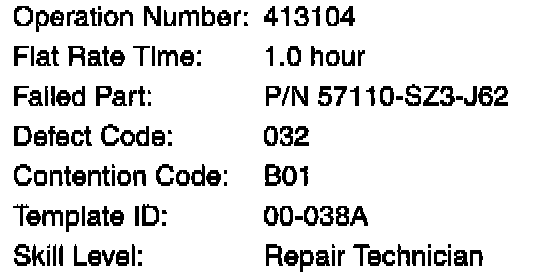
In warranty:
The normal warranty applies.
Out of warranty:
Any repair performed after warranty expiration may be eligible for goodwill consideration by the District Parts and Service Manager or your Zone Office. You must request consideration, and get a decision, before starting work.
DIAGNOSIS
Use the PGM Tester (SN110 or later software) to read the stored VSA DTC(s).
If the only DTC stored is a DTC 25, go to REPAIR PROCEDURE.
^ If any other DTCs are stored, troubleshoot those codes.
^ The DTC will have been erased if the customer has started the engine more than ten times since the DTC was stored. If you do not find any DTCs stored, ask the customer about the driving conditions when the VSA indicator came on. If the car was being driven on a road with many tight curves, go to REPAIR PROCEDURE.
REPAIR PROCEDURE
1. Disconnect the pressure sensor 3P connector from the VSA modulator-control unit.
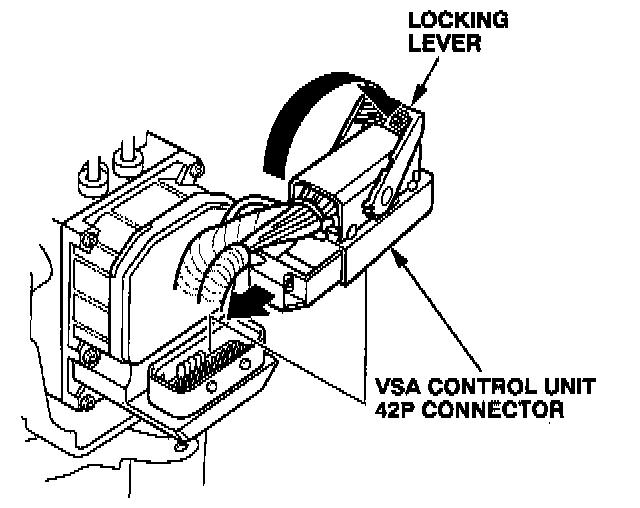
2. Pull back the locking lever on the VSA modulator - control unit 42P connector, then disconnect the connector from the unit.
3. Disconnect the six brake lines.
4. Remove the mounting nuts, then remove the VSA modulator - control unit.
5. Install the new VSA modulator-control unit in the reverse order of removal.
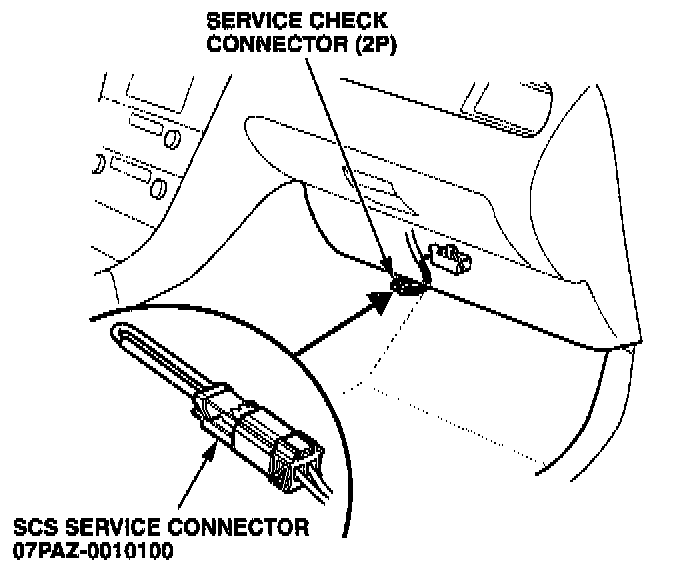
6. Connect the SCS service connector to the 2P connector under the glove box.
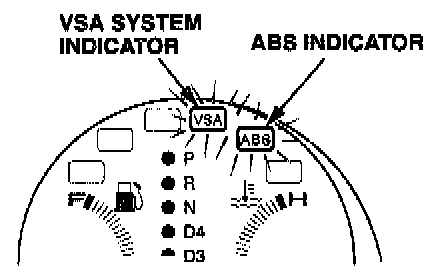
7. Make sure the steering wheel is in the straight - ahead position, then turn the ignition ON (II). The VSA and ABS indicators on the instrument panel will come on for 2 seconds, then go off for 1 second.
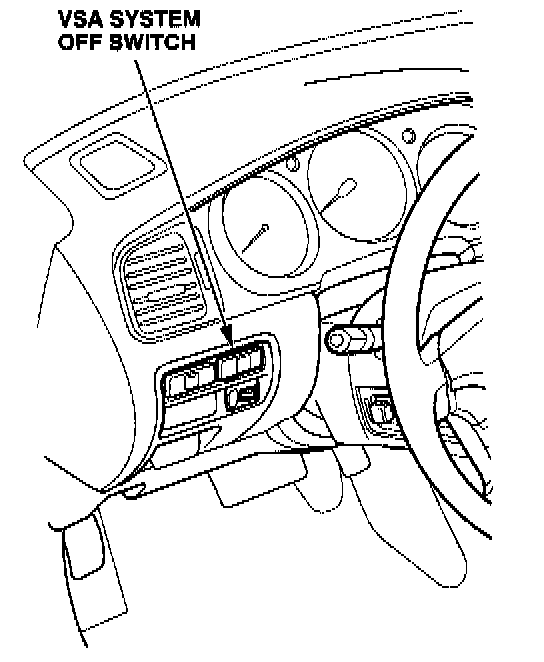
8. Quickly press and release the VSA off switch twice during the 1 second that the VSA and ABS indicators are off.
NOTE:
^ If you do not press the button twice while the indicators are oft, the system will not go into steering angle memorization mode, and the VSA Activation indicator will turn oft before you complete the procedure.
^ The ABS indicator will begin blinking a DTC 84. This code will clear when you complete the procedure.
Complete steps 9 thru 13 within 7 seconds.
9. The VSA Activation indicator will blink once, then stay on. Turn the steering wheel to the right until the indicator turns off (about 20 degrees).
10. Turn the steering wheel back to the straight - ahead position. The VSA Activation indicator will come back on.
11. Turn the steering wheel to the left until the VSA Activation indicator turns off.
12. Turn the steering wheel back to the straight - ahead position. The VSA Activation indicator will come back on.
13. Press the VSA off switch. The VSA Activation indicator will turn off, then come back on.
NOTE:
If the indicator turns oft and does not come back on, disconnect the modulator-control unit 42P connector for 30 seconds. Reconnect the connector and repeat steps 7 thru 13. To prevent this from happening, make sure you complete steps 9 thru 13 within 7 seconds.
14. Press the VSA off switch again. The VSA Activation indicator should blink five times to indicate successful memorization. If it does not blink, repeat steps 7 thru 13.
15. Turn the ignition switch to LOCK (0).
16. Perform the Precharge Brake Line Bleeding Procedure (see page 19-271 of the 96-01 3.5RL Service Manual).
17. Remove the SCS service connector.
18. Bleed the brake system, starting with the front calipers.
19. Start the engine. Make sure the ABS and VSA indicators turn off. Test-drive the vehicle to make sure the indicators remain off.

Disclaimer