Pinpoint Test R: Intermittent No Medium Speed Controller Area Network (MS-CAN) Communication, One Or More Modules Are Not Respo
Communications Network
Pinpoint Tests
Pinpoint Test R: Intermittent No Medium Speed Controller Area Network (MS-CAN) Communication, One Or More Modules Are Not Responding During Network Test
Normal Operation
An open circuit VDB06 (GY/OG) (MS-CAN +) or VDB07 (VT/OG) (MS-CAN -) may cause intermittent or unreliable communication to all modules on the Medium Speed Controller Area Network (MS-CAN). The MS-CAN is used for communication between the following modules:
- Accessory Protocol Interface Module (APIM)
- Audio Control Module (ACM)
- Driver Seat Module (DSM)
- HVAC module
- Instrument Cluster (IC)
- Parking Aid Module (PAM)
- Power Running Board (PRB) module
- Rear Entertainment Module (RETM)
- Satellite Digital Audio Receiver System (SDARS) module
- Smart Junction Box (SJB)
In the event that 1 of the 2 network circuits (MS-CAN + or MS-CAN -) becomes open to a module on the network, unreliable network communication to all modules on the network may result.
This pinpoint test is intended to diagnose the following:
- Wiring, terminals or connectors
PINPOINT TEST R: INTERMITTENT NO MS-CAN COMMUNICATION, ONE OR MORE MODULES ARE NOT RESPONDING DURING NETWORK TEST
NOTE: Most faults are due to connector and/or wiring concerns. Carry out a thorough inspection and verification before proceeding with the pinpoint test. Inspection and Verification
NOTE: Various network DTCs will set while disabling modules in this test procedure which will need to be cleared after the diagnostic procedure is completed.
NOTE: Failure to disconnect the battery when instructed will result in false resistance readings. Refer to Battery.
-------------------------------------------------
R1 CHECK THE DLC PINS FOR DAMAGE
- Ignition OFF.
- Disconnect the scan tool cable from the DLC.
- Inspect DLC pins 3 and 11 for damage.
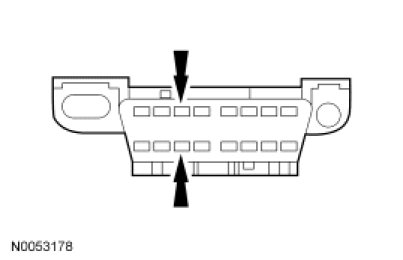
- Are DLC pins 3 and 11 OK?
Yes
GO to R2.
No
REPAIR the DLC as necessary. CLEAR the DTCs. REPEAT the network test with the scan tool.
-------------------------------------------------
R2 CHECK THE MS-CAN TERMINATION RESISTANCE
- Disconnect: Negative Battery Cable.
- Measure the resistance between the DLC C251-3, circuit VDB06 (GY/OG), harness side and the DLC C251-11, circuit VDB07 (VT/OG), harness side.
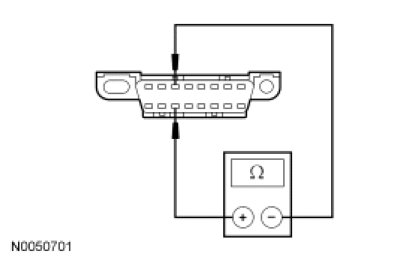
- Is the resistance between 54 and 66 ohms?
Yes
GO to R3.
No
CONNECT the negative battery cable. Go To Pinpoint Test P. Pinpoint Test P: The Accessory Protocol Interface Module (APIM) Does Not Respond To The Scan Tool
-------------------------------------------------
R3 CHECK THE MS-CAN (+) AND MS-CAN (-) CIRCUITS FOR A SHORT TO GROUND
- Measure the resistance between the DLC C251-3, circuit VDB06 (GY/OG), harness side and ground; and between the DLC C251-11, circuit VDB07 (VT/OG), harness side and ground.
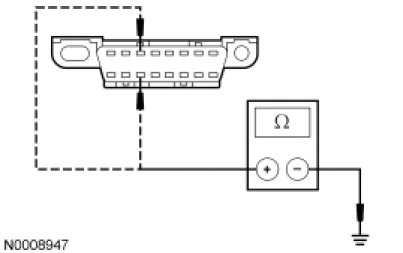
- Are the resistances greater than 1,000 ohms?
Yes
CONNECT the negative battery cable. GO to R4.
No
CONNECT the negative battery cable. Go To Pinpoint Test P. Pinpoint Test P: The Accessory Protocol Interface Module (APIM) Does Not Respond To The Scan Tool
-------------------------------------------------
R4 CHECK THE MS-CAN (+) AND MS-CAN (-) CIRCUITS FOR A SHORT TO VOLTAGE
- Ignition ON.
- Measure the voltage between the DLC C251-3, circuit VDB06 (GY/OG), harness side and ground; and between the DLC C251-11, circuit VDB07 (VT/OG), harness side and ground.
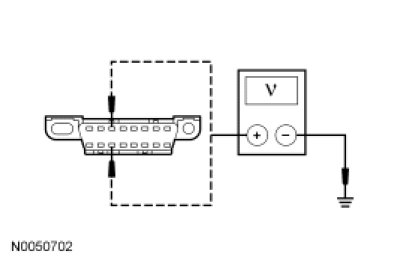
- Are the voltages greater than 6 volts?
Yes
REPAIR the circuit in question. CLEAR the DTCs. REPEAT the network test with the scan tool.
No
GO to R5.
-------------------------------------------------
R5 CHECK FOR RESTORED NETWORK COMMUNICATION WITH THE HVAC MODULE DISABLED
- Disconnect: SJB Fuses 20 (10A) and 28 (10A).
- Enter the following diagnostic mode on the scan tool: Network Test.
- Repeat the network test.
- Do all other modules pass the network test?
Yes
INSTALL the removed fuses. Go To Pinpoint Test I. Pinpoint Test I: The HVAC Module Does Not Respond To The Scan Tool
No
INSTALL the removed fuses. GO to R6.
-------------------------------------------------
R6 CHECK FOR RESTORED NETWORK COMMUNICATION WITH THE ACM DISABLED
- Disconnect: SJB Fuse 3 (20A) and 12 (5A).
- Enter the following diagnostic mode on the scan tool: Network Test.
- Repeat the network test.
- Do all other modules pass the network test?
Yes
INSTALL the removed fuses. Go To Pinpoint Test J. Pinpoint Test J: The Audio Control Module (ACM) Does Not Respond To The Scan Tool
No
INSTALL the removed fuses. GO to R7.
-------------------------------------------------
R7 VERIFY VEHICLE EQUIPMENT - DSM
- Inspect the vehicle for a DSM.
- Is the vehicle equipped with a DSM?
Yes
GO to R8.
No
GO to R9.
-------------------------------------------------
R8 CHECK FOR RESTORED NETWORK COMMUNICATION WITH THE DSM DISABLED
- Disconnect: SJB Fuse 1 (20A).
- Enter the following diagnostic mode on the scan tool: Network Test.
- Repeat the network test.
- Do all other modules pass the network test?
Yes
INSTALL the removed fuse. Go To Pinpoint Test M. Pinpoint Test M: The Driver Seat Module (DSM) Does Not Respond To The Scan Tool
No
INSTALL the removed fuse. GO to R9.
-------------------------------------------------
R9 VERIFY VEHICLE EQUIPMENT - PRB MODULE
- Inspect the vehicle for power running boards.
- Is the vehicle equipped with power running boards?
Yes
GO to R10.
No
GO to R11.
-------------------------------------------------
R10 CHECK FOR RESTORED NETWORK COMMUNICATION WITH THE PRB MODULE DISABLED
- Disconnect: BJB Fuse 19 (30A).
- Enter the following diagnostic mode on the scan tool: Network Test.
- Repeat the network test.
- Do all other modules pass the network test?
Yes
INSTALL the removed fuse. Go To Pinpoint Test N. Pinpoint Test N: The Power Running Board Module Does Not Respond To The Scan Tool
No
INSTALL the removed fuse. GO to R11.
-------------------------------------------------
R11 VERIFY VEHICLE EQUIPMENT - RETM APIM AND/OR SDARS MODULE
- Inspect the vehicle for an RETM, an APIM, and/or a SDARS module.
- Is the vehicle equipped with an RETM, an APIM and/or a SDARS module?
Yes
GO to R12.
No
GO to R14.
-------------------------------------------------
R12 CHECK FOR RESTORED NETWORK COMMUNICATION WITH THE RETM, APIM, AND/OR SDARS MODULE DISABLED
NOTE: When re-running the network test, the network test application must be first closed or the screen display will revert back to the prior run network test results.
- Disconnect: BJB Fuse 41 (15A).
- Enter the following diagnostic mode on the scan tool: Network Test.
- Repeat the network test.
- Do all other modules pass the network test?
Yes
INSTALL the removed fuse. For vehicles equipped with two or more of the following modules: RETM, APIM, SDARS module, GO to R13.
For vehicles equipped with a RETM only, Go To Pinpoint Test L. Pinpoint Test L: The Rear Entertainment Module (RETM) Does Not Respond To The Scan Tool
For vehicles equipped with a APIM only, Go To Pinpoint Test P. Pinpoint Test P: The Accessory Protocol Interface Module (APIM) Does Not Respond To The Scan Tool
For vehicles equipped with a SDARS module only, Go To Pinpoint Test K. Pinpoint Test K: The Satellite Digital Audio Receiver System (SDARS) Module Does Not Respond To The Scan Tool
No
INSTALL the removed fuse. GO to R16.
-------------------------------------------------
R13 VERIFY VEHICLE EQUIPMENT - RETM
- Inspect the vehicle for an RETM.
- Is the vehicle equipped with an RETM?
Yes
GO to R14.
No
GO to R15.
-------------------------------------------------
R14 CHECK FOR RESTORED NETWORK COMMUNICATION WITH THE RETM DISCONNECTED
NOTE: When re-running the network test, the network test application must be first closed or the screen display will revert back to the prior run network test results.
- Disconnect: RETM C9029.
- Enter the following diagnostic mode on the scan tool: Network Test.
- Repeat the network test.
- Do all other modules pass the network test?
Yes
CONNECT the RETM. Go To Pinpoint Test L. Pinpoint Test L: The Rear Entertainment Module (RETM) Does Not Respond To The Scan Tool
No
GO to R15
-------------------------------------------------
R15 CHECK FOR RESTORED NETWORK COMMUNICATION WITH THE APIM DISCONNECTED
NOTE: When re-running the network test, the network test application must be first closed or the screen display will revert back to the prior run network test results.
- Disconnect: APIM C3342.
- Enter the following diagnostic mode on the scan tool: Network Test.
- Repeat the network test.
- Do all other modules pass the network test?
Yes
CONNECT the APIM. Go To Pinpoint Test P. Pinpoint Test P: The Accessory Protocol Interface Module (APIM) Does Not Respond To The Scan Tool
No
CONNECT the APIM. Go To Pinpoint Test K. Pinpoint Test K: The Satellite Digital Audio Receiver System (SDARS) Module Does Not Respond To The Scan Tool
-------------------------------------------------
R16 VERIFY VEHICLE EQUIPMENT - PAM
- Inspect the vehicle for a PAM.
- Is the vehicle equipped with a PAM?
Yes
GO to R17.
No
GO to R18.
-------------------------------------------------
R17 CHECK FOR RESTORED NETWORK COMMUNICATION WITH THE PAM DISABLED
- Disconnect: SJB Fuse 18 (10A).
- Enter the following diagnostic mode on the scan tool: Network Test.
- Repeat the network test.
- Do all other modules pass the network test?
Yes
INSTALL the removed fuse. Go To Pinpoint Test O. Pinpoint Test O: The Parking Aid Module (PAM) Does Not Respond To The Scan Tool
No
INSTALL the removed fuse. GO to R18.
-------------------------------------------------
R18 CHECK FOR RESTORED NETWORK COMMUNICATION WITH THE IC DISABLED
NOTE: When re-running the network test, the network test application must be first closed or the screen display will revert back to the prior run network test results.
- Disconnect: SJB Fuse 8 (15A) and 24 (10A).
- Enter the following diagnostic mode on the scan tool: Network Test.
- Repeat the network test.
- Do all other modules pass the network test?
Yes
INSTALL the removed fuses. Go To Pinpoint Test G. Pinpoint Test G: The Instrument Cluster (IC) Does Not Respond To The Scan Tool
No
INSTALL the removed fuses. An intermittent fault is not present. Go To Pinpoint Test Q. Pinpoint Test Q: No Medium Speed Controller Area Network (MS-CAN) Communication, All Modules Are Not Responding
-------------------------------------------------