Audio Unit Button Does Not Work
Audio System Symptom Troubleshooting - Audio unit button does not work (without navigation system)
Audio unit button does not work (without navigation system)
NOTE:
- Check the vehicle battery condition first Battery Test.
- Check the connectors for poor connections or loose terminals.
- In order to troubleshoot the POWER () button, go to Audio unit power switch will not turn on troubleshooting Without Navigation System.
- In order to troubleshoot the VOLUME knob, go to Volume does not change troubleshooting Without Navigation System.
1. Go to the audio button and knob detection mode in the Self-Diagnostic Function Audio System Self-Diagnostic Function.
2. Operate all items in the appropriate switch list.
Switch list
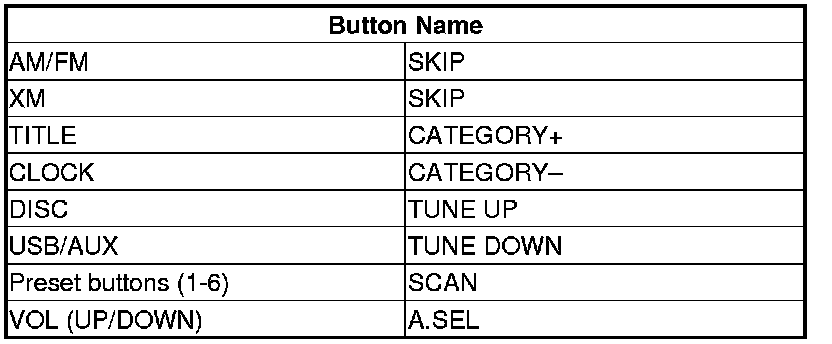
Do all the items in the appropriate switch list work properly?
YES -
Operation is normal.�
NO -
Substitute a known-good audio and HVAC switch panel Audio and HVAC Switch Panel Removal/Installation. If the symptom/indication goes away, replace the original audio and HVAC switch panel Audio and HVAC Switch Panel Removal/Installation. If the symptom still present, replace the audio unit Audio Unit Removal/Installation.�